

A sitemap is a way to organize and communicate the pages on a website. It helps search engines discover your content and helps humans understand how everything fits together.
Think of it as a map of your website. Some maps are made for search engines, like Google, while others are made for humans, like designers, developers, and the folks responsible for making sure visitors can find what they need.
There are two main types of sitemaps:
- XML sitemaps
 A list of website URLs that are readable by machines, they help search engines discover pages.
- Visual sitemaps
 A diagram showing how website pages are organized and connected, making it easier to plan and communicate a site's structure.
Both are useful, but they serve very different audiences.
Sitemap example: Let's build a chocolate shop

Let's say you have a small chocolate business. Your chocolates are selling like hotcakes (hot chocolates?), and you're ready to bring your business online.
You don't need anything fancy just yet. A homepage, a shop, an about page, and a way for customers to get in touch.
But you've got plans. Soon, you'll be selling chocolate gift boxes, seasonal collections, and maybe even offering subscriptions (because who wouldn't want chocolate delivered every month?).
Exciting times for your chocolate shop.
Before you jump into designing pages, you need a way to organize what exists today and what you'll need tomorrow.
That's where a visual sitemap comes in.
Search engines, on the other hand, only need to know about the pages that are actually live. That's where an XML sitemap comes in.
Same chocolate shop. Two different maps. Two very different jobs.
You need a way to communicate which pages exist today and which ones your team will need to think about tomorrow.
What is an XML sitemap for SEO?
An XML sitemap is a file that lists the URLs on your website that you want search engines to know about. It helps search engines, like Google, discover your pages and understand when they've been updated.
XML stands for Extensible Markup Language, which is a fancy way of saying it's a structured format computers can read.
Unlike a visual sitemap, an XML sitemap isn't designed to look be quickly digestable for humans. Pretty much, it's designed to be read by search engines.
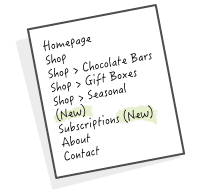
For example, the simple list of pages shown above, in an XML sitemap, that list becomes something like what's shown to the right.
Not exactly a page-turner, but search engines know what to do with it.
<?xml version="1.0" encoding="UTF-8"?>
<urlset xmlns="http://www.sitemaps.org/schemas/sitemap/0.9">
  <url>
    <loc>https://example.com/</loc>
  </url>
  <url>
    <loc>https://example.com/shop</loc>
  </url>
  <url>
    <loc>https://example.com/shop/chocolate-bars</loc>
  </url>
  <url>
    <loc>https://example.com/shop/gift-boxes</loc>
  </url>
  <url>
    <loc>https://example.com/about</loc>
  </url>
  <url>
    <loc>https://example.com/contact</loc>
  </url>
</urlset>
What information does an XML sitemap contain?
An XML sitemap can include several pieces of information:
<loc>: The URL of a page. This is the essential part.<lastmod>: The date the page was last meaningfully updated. This is optional.
And submitting an XML sitemap doesn't guarantee your pages will appear in search results. It doesn't hurt, it's really easy to include one and upload it to Google Search Console so so you might as well. Think of it as handing Google a map, not buying your way onto the front page.
Do you need an XML sitemap?
Not every website absolutely needs one.
If your website is small and all your pages are properly linked, search engines may discover them without a sitemap.
But XML sitemaps are especially helpful when your website matches any of the conditions to the right.
Even for smaller websites, having an XML sitemap is generally a good practice.
- Has lots of pages.
- Is brand new and doesn't have many external links.
- Contains pages that aren't easily discovered through internal links.
- Frequently publishes or updates content.
- Has complex content, such as large product catalogs.
What is a visual sitemap?
A visual sitemap is a diagram that shows the hierarchy and organization of pages on a website. It's a way to see how pages relate to each other without having to click through every single one.
Unlike XML sitemaps, visual sitemaps are made for humans.
They're especially useful when planning a new website, redesigning an existing one, or communicating a website's structure to a team.
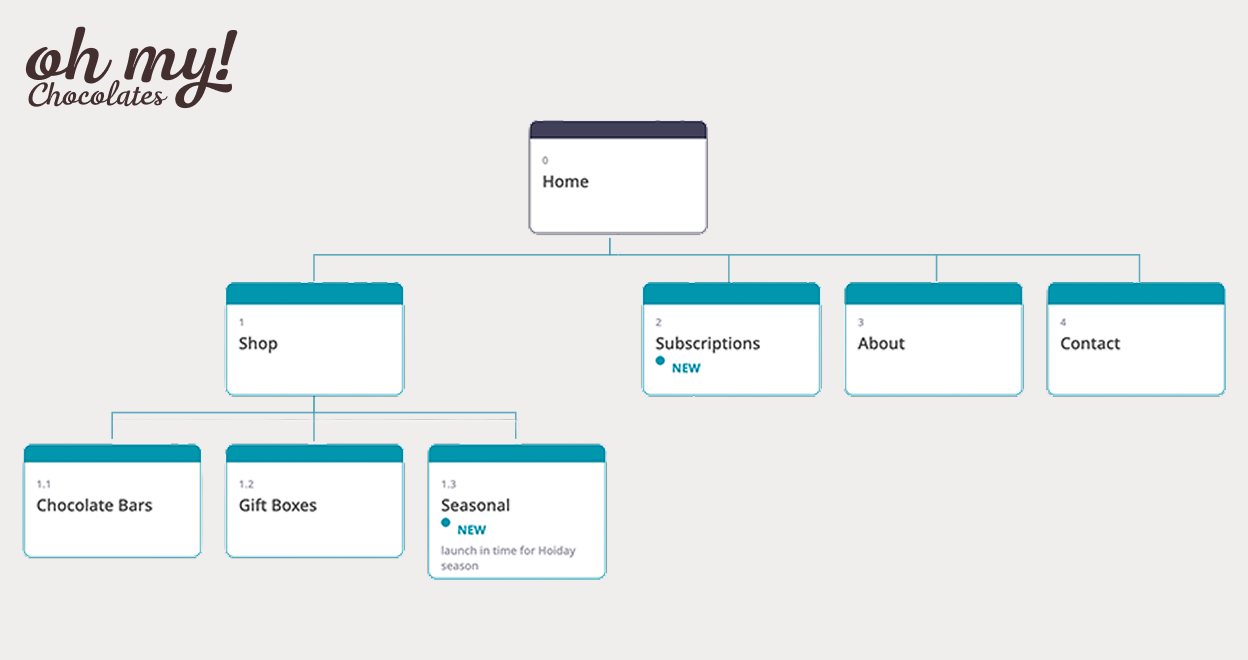
For our chocolate shop, a visual sitemap might look something like the image below. Just like that, you can quickly grasp the structure of the site.
Notice how much easier it is to understand the relationships between pages?
Instead of reading through a long list of URLs, you can see the structure at a glance.
Why use a visual sitemap?
Visual sitemaps are a great starting point for website planning.
And here's something I particularly love about visual sitemaps: they encourage conversations about the content before anyone gets too attached to the design.
It's much easier to move a box around than to redesign an entire page because you realized it belongs somewhere else.
They help you:
- Organize content: Figure out what pages you need and how they should be grouped.
- Plan navigation: Understand how visitors might move through your website.
- Find missing pages: Spot gaps in your content before development begins.
- Communicate w0ith your team: Get designers, developers, marketers, and stakeholders looking at the same picture.
- Plan for growth: Show both existing pages and pages you'll need in the future.
When should you create a visual sitemap?
Ideally, before you start designing your website.
A visual sitemap helps establish the information architecture, which is just a fancy term for how content is organized, labeled, and connected.
Getting this right early makes the website easier to navigate, easier to maintain, and easier to grow.
But visual sitemaps aren't just for new websites. They're also handy when you're auditing an existing site, restructuring navigation, or planning new content.
XML sitemap vs. visual sitemap: What's the difference?
Both types of sitemaps help communicate website structure, but their purpose and audience are different.
| Comparison | XML sitemap | Visual sitemap |
|---|---|---|
| Audience | Search engines | Humans |
| Format | Structured XML file | Diagram or flowchart |
| Main purpose | Help discover website URLs | Plan and communicate site structure |
| When to create | When pages are live | Before, during, or after development |
| Includes future pages? | No, generally only live URLs | Yes |
| Helps with SEO? | Directly supports URL discovery | Indirectly supports better site organization |
The takeaway? XML sitemaps help search engines discover your pages. Visual sitemaps help people organize and understand them.
You don't have to choose one over the other. In fact, using both can make your website better for humans and search engines alike.
Best sitemap tools to get started
Now that you know the difference, let's look at some tools that make creating sitemaps easier.
XML sitemap generators
If your goal is to help search engines discover your pages, you'll want an XML sitemap generator.
Screaming Frog SEO Spider
Screaming Frog can crawl your website and generate an XML sitemap based on the URLs it discovers. It's particularly useful for website audits and more complex sites.
Your website framework or platform
Many website platforms and frameworks support XML sitemap generation, either automatically or through built-in configuration and plugins.
For example, Next.js supports generating sitemaps using a sitemap.ts or sitemap.js file.
You may not need another tool at all. How's that for saving a few clicks?
Visual sitemap makers
If you're planning a website or need to communicate its structure to your team, a visual sitemap maker is what you're after.
Miro
Miro is a collaborative whiteboard tool with templates and diagramming features. It's a good option if you're already using it for brainstorming and workshops.
PowerPoint or Google Slides
Yep, you can create a visual sitemap using your favorite presentation tool. Start with boxes, connect them with lines, and organize everything into a hierarchy.
It works, although keeping all those boxes and connectors aligned as your website grows can get a little tedious.
Create a Visual Sitemap
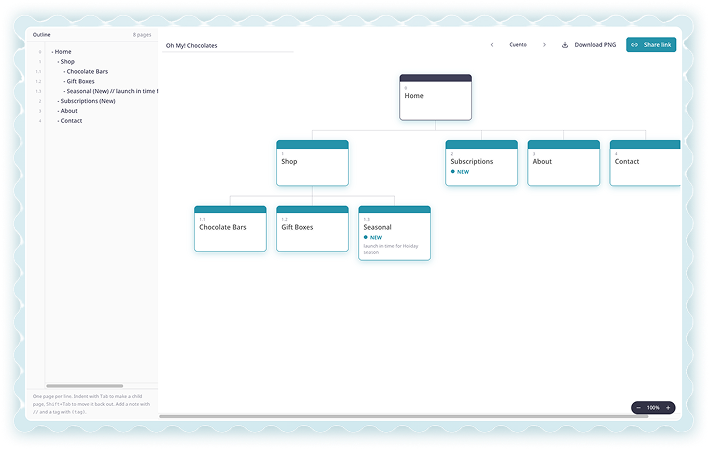
If you already have a list of pages and just want to see them as a visual sitemap, try our Visual Sitemap Maker.
Simply copy and paste your page list and instantly turn it into a visual structure.
Less time nudging rectangles. More time thinking about your website.
How to generate a sitemap for an existing website
What if you already have a website but don't have a clear picture of how everything is organized?
You could click through every page, copy the URLs, and manually build a list.
Or you could save yourself a whole lot of clicking.
There are tools that can crawl an existing website and help you understand its structure.
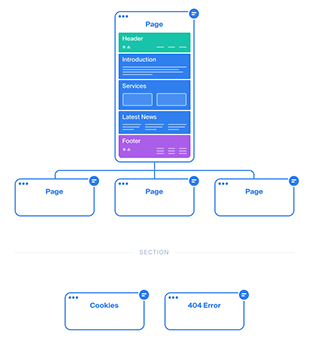
Octopus.do offers tools for visual sitemap planning and website structure discovery.
It's especially useful when you want to turn an existing website into something you can review visually.

PowerMapper creates visual maps of existing websites and offers tools for understanding site structure.
It may not have the same visual polish as some newer diagramming tools, but it can be useful for larger and more complicated websites.
For websites behind authentication or a firewall, you'll need to check which crawling options and configurations are supported.
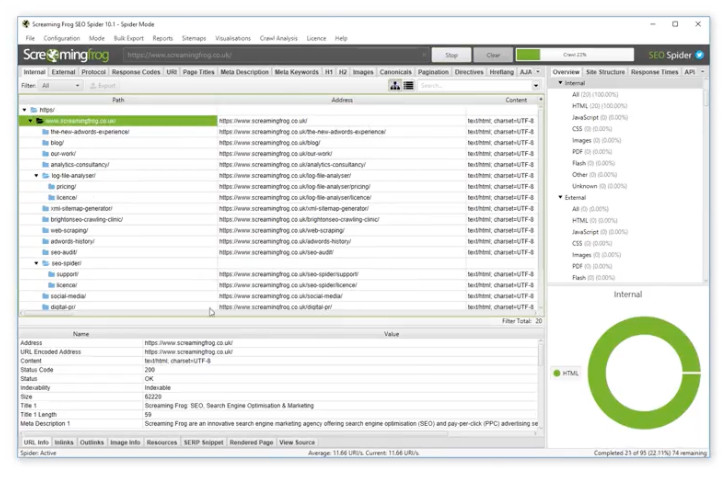
Screaming Frog is another useful option for discovering existing pages.
It's more focused on technical SEO than visual planning, but it's a powerful way to inventory URLs and identify structural issues.
A quick heads-up: Crawling tools can only discover content they can access. Pages behind logins, disconnected pages, or pages that require special interactions may not appear in the results.
Frequently asked questions about sitemaps
What is a sitemap in simple terms?
A sitemap is a map of the pages on your website. An XML sitemap helps search engines discover those pages, while a visual sitemap helps people understand how they're organized.
Is a sitemap the same as website navigation?
Not quite. Website navigation is what visitors use to move around your site, like the menu at the top of a page. A sitemap describes or illustrates the website's structure and may include pages that aren't directly linked from the main navigation.
Does a sitemap improve SEO?
An XML sitemap can help search engines discover your pages, especially on large or complex websites. However, having a sitemap doesn't automatically improve rankings or guarantee indexing.
A visual sitemap can indirectly support SEO by helping you plan a clear website hierarchy and identify opportunities for better internal linking.
Can I create a sitemap for free?
Yes. Many website platforms generate XML sitemaps automatically, and tools like Canva, Miro, and Google Slides offer ways to create visual sitemaps. Some tools have free plans with limitations.
Should I create a sitemap before designing my website?
A visual sitemap? Absolutely. It's one of the best ways to plan your website's content and structure before jumping into design.
An XML sitemap is generally generated when your pages are live and ready for search engines to discover.
A little planning goes a long way
Whether you're building a brand-new website or trying to make sense of one that's grown over the years, sitemaps help bring a little order to the chaos.
An XML sitemap helps search engines discover your content. A visual sitemap helps you and your team see the bigger picture, organize pages, and create a website that's easier for visitors to navigate.
And when your content is thoughtfully organized, everyone benefits: your visitors, your team, and even the search engines trying to make sense of it all.
Ready to map out your website?
Try StoryTell's Visual Sitemap Maker and turn your page list into a visual sitemap without spending your afternoon moving boxes around.